
23 October 2026
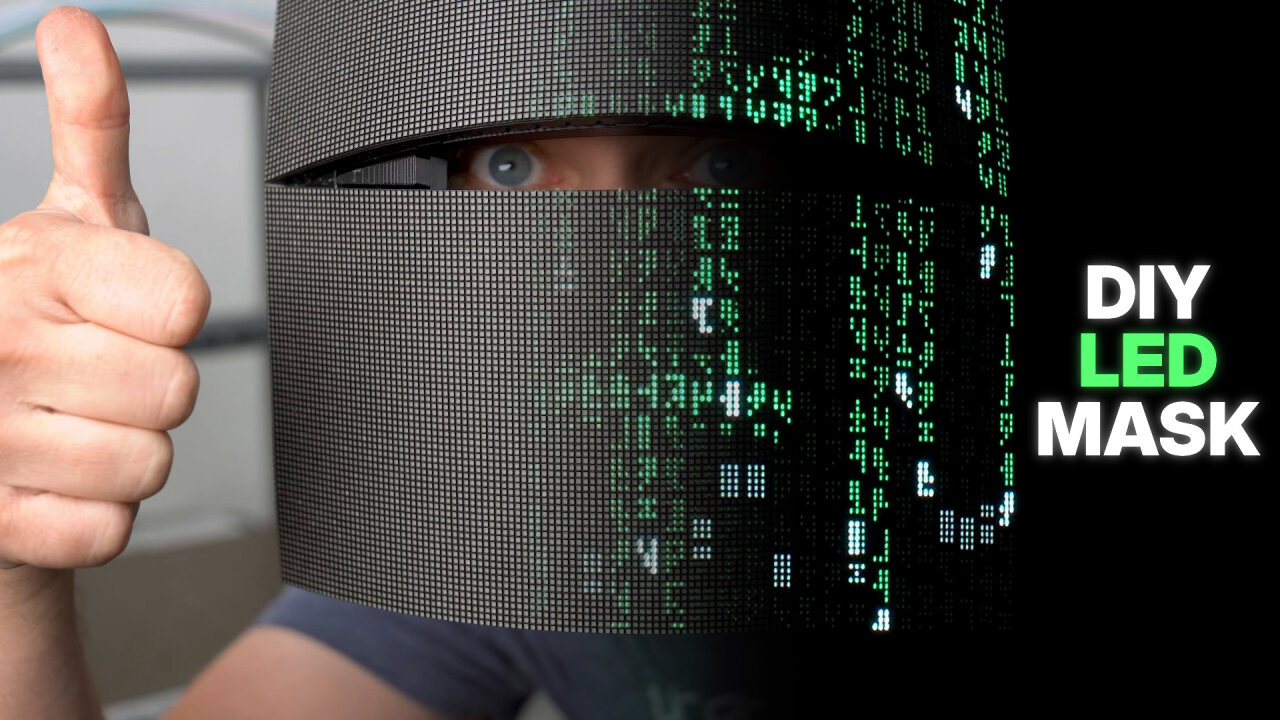
In a week, my uncle will throw a Halloween party, so I’ll need a costume. It might have gotten a bit out of hand with two 128x64 flexible LED matrix panels, an additional 180 individually addressable LEDs, two Raspberry Pi Pico 2 Ws and a Bluetooth speaker. It became a costume that changes its look at will.
The video shows the costume in action and demonstrates how it is controlled with an overview of the build. The article here goes into details of the build.
Please note that this article contains affiliate links, i.e. links that tell the target site that I sent you there and that earn me a share of their revenue in return, i.e. as an Amazon Associate I earn from qualifying purchases. In contrast to regular external links, such affiliate links are marked with a dollar sign instead of a box.
This project requires running up to 3 amps through self-assembled circuits. If you want to copy this project, make sure that you know how to solder properly, which wires to use for such currents and how to secure everything to not create weak links through stress. The project only runs on 5V, so failure to do this properly usually ends in voltage drops and brown-outs, but nevertheless this setup can deliver 15W. That may not sound like much, but put into a single weak link this is enough to create heat and cause a fire. Be warned, take care and understand that I do not take responsibility.
Also be warned that this is not a step-by-step guide. I try to document and share as much as possible, but this project is complex and some parts are simply improvised with material I had at hand. Many components (especially common material from my workshop like zip ties, cables etc.) are not on the shopping list and some steps (like fixing stuff to the face shield helmet with zip ties) were done on the spot and are not documented. You should be ready to find your own solutions for some parts.
Finally, don’t expect the result to be comfortable. As shown in the video, this is mostly a show-off costume that cannot be worn over a long period. The biggest issue is that the mask is too heavy and not well balanced on your head. Also, you can barely see through it.
The costume consists of two parts: A mask and a staff.

The mask is the main feature of the costume. It is made from two flexible LED matrix panels1 that are bent to roughly follow2 the shape of a face and also tilted away from each other to form a narrow slit through which the wearer can see. The panels can be used to show different faces and animations. The top and sides are hidden below the hood of a wizard-style robe.
The staff, however, is the more complex part. By itself, it is roughly 1.80 meters tall and has individually addressable LEDs from almost the bottom to the top. At the top there is a crystal, which covers the topmost LEDs, so effectively that crystal can also be colored differently. About one third from the top is a grip with controls for the costume. There is a rotary encoder and two buttons. Normally, one would rotate the rotary encoder to select the next scene, which is indicated by a matching pulsing glow of the crystal. To apply the scene, the staff is stomped onto the ground, which is detected by an accelerometer in the staff.
When a stomp is detected, a transition animation is played on the staff and the mask in sync to initiate the next scene/face. Along with this animation a sound is played through a Bluetooth speaker that I typically wear on my belt3. There is a minimal delay between the stomp and the animation because the Bluetooth audio stream has a bit of a delay, but we are talking about a quarter of a second here. The animations wait for the sound, so they still match, but this latency is different for every speaker, so it needs to be adjusted in the firmware if you use a different one.
The additional buttons are mostly shortcuts to reach additional functions or to make it easier to control some features without looking. Short and long presses of the two buttons (plus the press of the rotary encoder) allow pairing of the Bluetooth speaker, cancelling a selected scene, selecting the base scene, selecting the first scene, initiating a transition without stomping and switching to different “playlists”4.
Both parts of the costume are controlled by a Raspberry Pi Pico 2 W. I simply love their programmable IOs (PIOs) as you might know from other projects (like the GB Interceptor). In this case, they allow keeping the timing of the various peripheral protocols (in particular the HUB75 for the matrix panels) while dealing with less reliable timing from wireless communication. They use Bluetooth to stay in sync and the Pi Pico of the staff also uses Bluetooth to feed audio to the Bluetooth speaker. Both Pi Picos are also hooked up to an SD card reader, which holds a micro SD card with the videos, sounds and LED animations for each part.
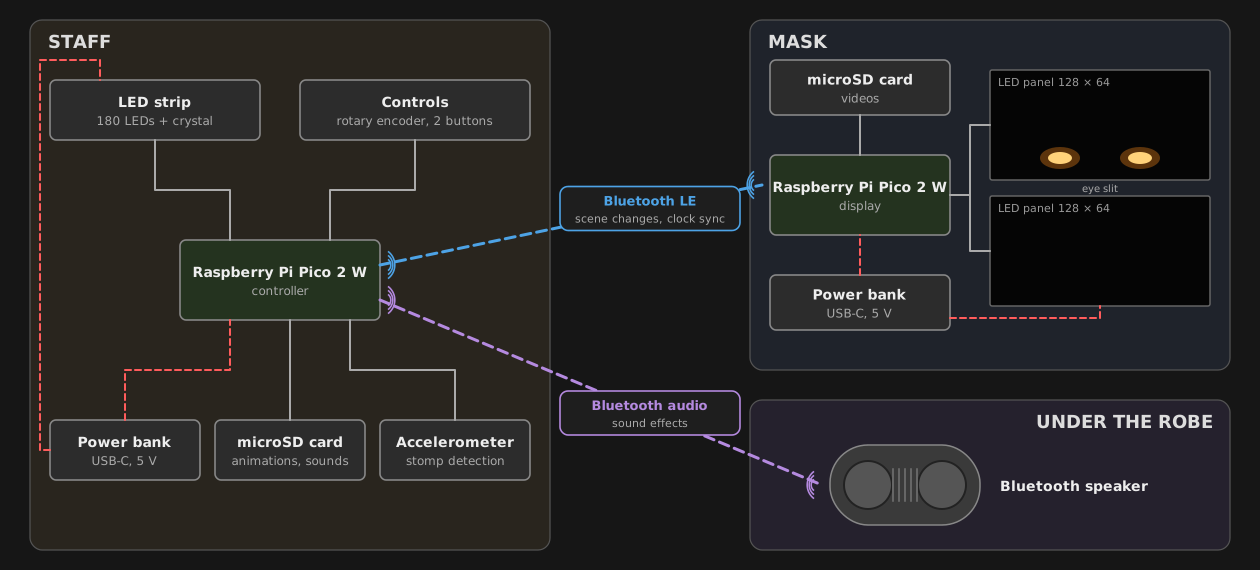
The controller Pi Pico is hooked up to the LED strip through a level shifter, so its 3.3V GPIOs can speak with the 5V logic of the addressable LEDs reliably. It is also connected to an accelerometer, the rotary encoder5 and the two buttons. The mask Pi Pico just drives the LED panels, also through level shifters (two 74HCT245), while reading the videos from its SD card.
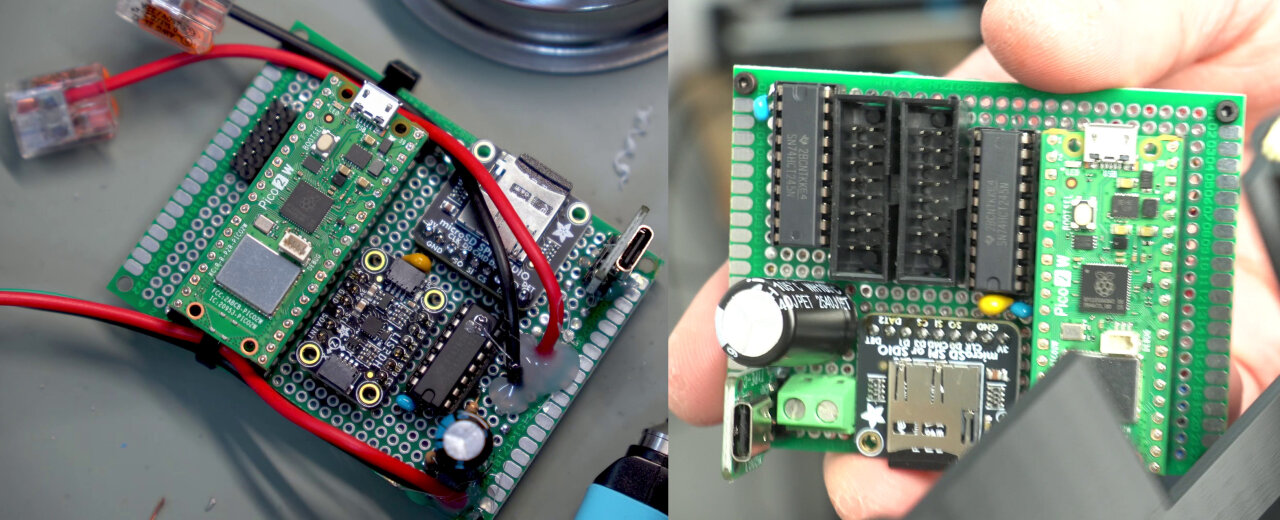
I tested both on a breadboard and then soldered everything onto perfboards. This part is probably one of the first things you will need to improvise as I used leftover screw terminals6 and perfboards I just had at hand. They are 80mm by 60mm with M2 mount holes spaced at 75mm and 55mm. The mount for the helmet and the base of the staff are both designed for these and you might need to adapt them if you have slightly different perfboards.
Another thing that both parts have in common is the power source. Each part is powered by a USB power bank (see shopping list below) that can deliver up to 3 amps. They are simply hooked up through a USB-C breakout board with hardwired resistors that make the power bank switch on its 5V output. Note that these resistors cannot request a specific current, so make sure that your power bank can actually deliver 3A at 5V on its USB-C port. I also highly recommend that you use a USB power meter to check the power of the assembled mask and staff to make sure they stay within the limits.
The software along with schematics and 3D print models can be found on GitHub. There you will also find details on flashing and adding your custom animations to the SD cards. However, I have to admit that I have not looked at a single line of code - it has all been written with Claude Code (Opus 5.5). If that’s all you need to know, you can skip the rest of this section, but I think this is a good occasion for me to share a few thoughts about coding with AI.
Just half a year ago, I was a big skeptic. I tried the web version of ChatGPT and the agentic version of Gemini integrated into Android Studio and both generated more work for me than they saved and I ditched them quickly. Then a colleague insisted I should try Claude Code and at that time Anthropic was running a promotion that meant I could use Fable 5.1 in the cheapest subscription - and that was like night and day. I am not saying that other providers don’t have such strong models. The shortcomings of ChatGPT and Gemini could be the free tier and in case of ChatGPT some can definitely be attributed to using the web version and not an agent, but Claude Code produced code with so few issues in such a short time that I was blown away. So good in fact, that I am confident that it found more human errors than it could have introduced AI ones and that it completed tasks from my todo lists in 10 minutes (plus 30 minutes of me testing and reviewing) that would have taken me days.
This leaves me in an odd position. On one hand, I am a physicist in a civil servant position (German “Beamter”) and my job is probably one of the most secure jobs in existence. On the other hand, a lot of what I do in that job and especially what I do as a hobby and on my blog and YouTube has been coding. My coding ability is one of the things I am most proud of and if you would ask me about my biggest achievements, I would probably mention phyphox7 (which is of course more than just code), my PhD thesis and the GB Interceptor, which I eventually presented at the Chaos Communication Congress in what might also be the talk I am most proud of. I am glad that I finished these projects while no one could doubt that I managed to do them without AI and I always thought that these skills were irreplaceable. Now, I am writing about my first project on this blog that was written by AI and I know that between my family and my job I would not have been able to complete it in time if I had done it manually.
Currently, I am sure that my experience makes a big difference in what comes out when I interact with an LLM. I know what to ask for, include design suggestions in my prompts and understand the AI’s suggestions and solutions. But I am not using prompt strategies. I am talking to it like to an experienced colleague and I am not sure how long even my experience will remain relevant. Searching for ignorant excuses not to use it will not make it go away, but it effectively renders some of my most valuable skills, well, not worthless, but commonplace. I see people writing apps who never cared about programming and people creating complicated simulations without any science background. Sure, there may be a difference in how I would validate results from an AI, but for many cases it is not that relevant after all.
Since I am in the comfortable position of not losing my job and just taking a massive blow to my ego, I can embrace this new world. Suddenly all those highly valued jobs are endangered while the “simple” labor jobs are the ones in high demand. I think I can live with this and appreciate the justice of a reversal of our society, if this all plays out to be widely available and turns our society into a utopia. Unfortunately, it seems like all the power of AI is in the hands of some of the worst people on the planet who have no regard for the social and ecological impact of their work and who seem to only seek to aggregate that power in one place. I can only hope that hardware eventually becomes affordable again, so that free models can liberate our society, so we can all share this power instead of creating a new kind of dictatorship. I have no idea which way it will go.
If you are still reading this, thanks for thinking about this, too, whether you agree or disagree. If you are reading this in the future, don’t laugh too hard, it’s 2026 and nobody has an idea where this is going and I hope so much that you are indeed laughing.
Ok, so back to building fun stuff. The following is an incomplete list of items I used to assemble this project. No, I did not buy all of this just for a Halloween costume. If you have to buy everything, this is a rather expensive project. But this is also not just an excuse to drop a bunch of Amazon affiliate links as these are items I really think are required or highly recommended.
Unfortunately, it is also not complete. For example, I am not listing every screw that I used from my screw collection and I am only giving generic values for heat-set inserts as there is no point in linking to the specific assortment I bought several years ago.
Also, as mentioned above, I highly recommend using a USB power meter to measure the actual current that is drawn by your setup to prevent the power bank from overloading and shutting down. For the same reason, I would also pick a reliable brand and not the cheapest available power bank, because in case of a mistake or a short circuit you really want it to shut down. This is even more important if you use different LEDs or panels than I do: The firmware limits the brightness to stay below about 2.6A, but it estimates the current with values that I measured for my panels and my strip. If your parts draw more, the power bank will shut down, so measure them and adjust these values.
A word of warning about the LED panels: There are many variants of these panels that look identical but use different driver chips, and as mentioned above, the AliExpress link might lead you to a different one. My firmware is written for HUB75E panels with 1/32 scan, FM6124C column drivers and SM5368 row drivers (you can read the chip names on the back of the panel). Panels with FM6126A drivers or regular binary row addressing (A to E) can be selected in the firmware, but anything else will probably require some changes to the code.
Both circuits are quite simple in how they work, but because of the many GPIO pins used, they require quite a few connections. I tried to move the pins on the level shifters such that they can be directly wired one to one to the 2x8 data plugs for the LED displays, but since the two displays need to be connected in parallel and since GPIO pins should be consecutive, this only moves the problem to the duplicate connections to the plugs and the mapping of the Pico’s GPIOs to the level shifters.
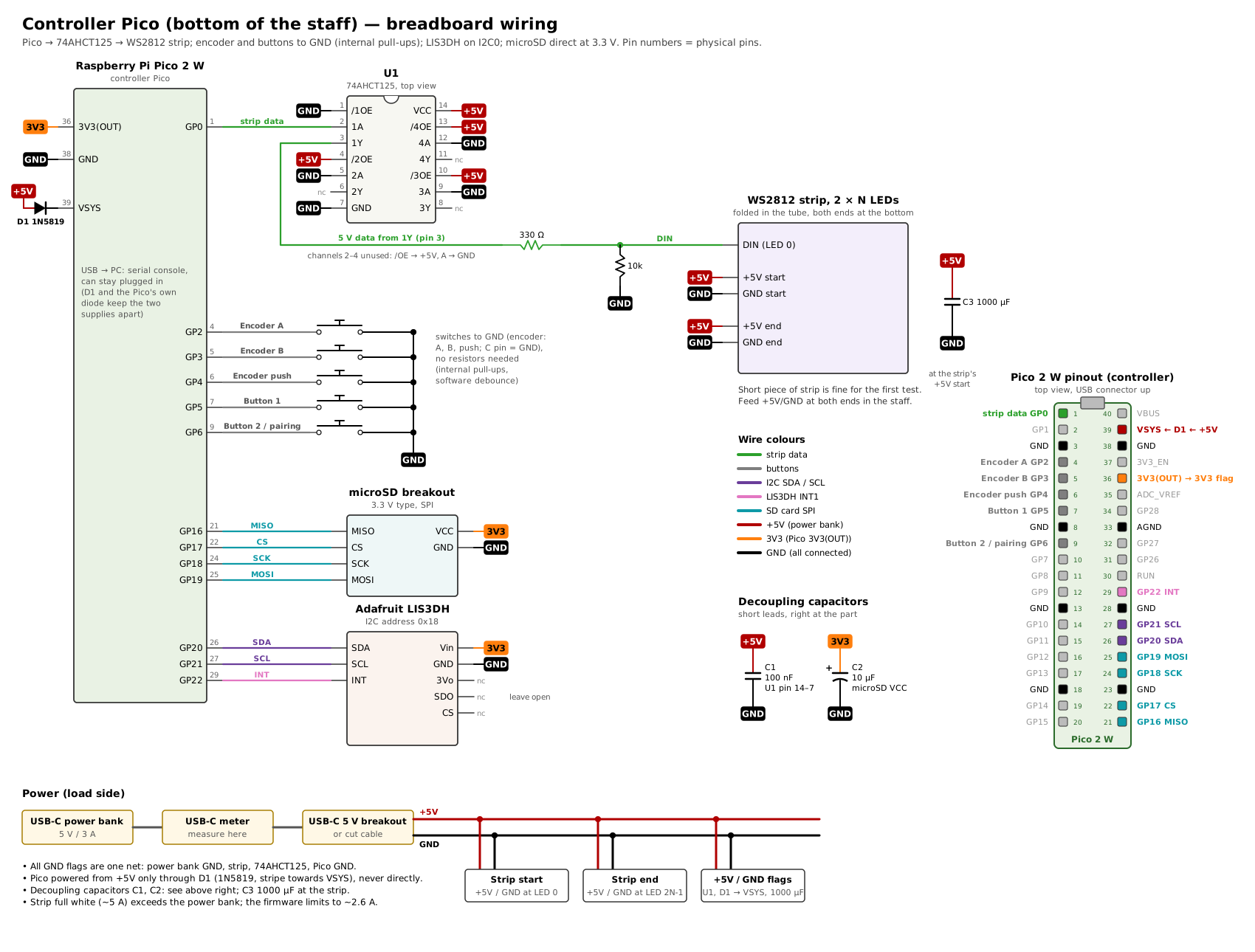
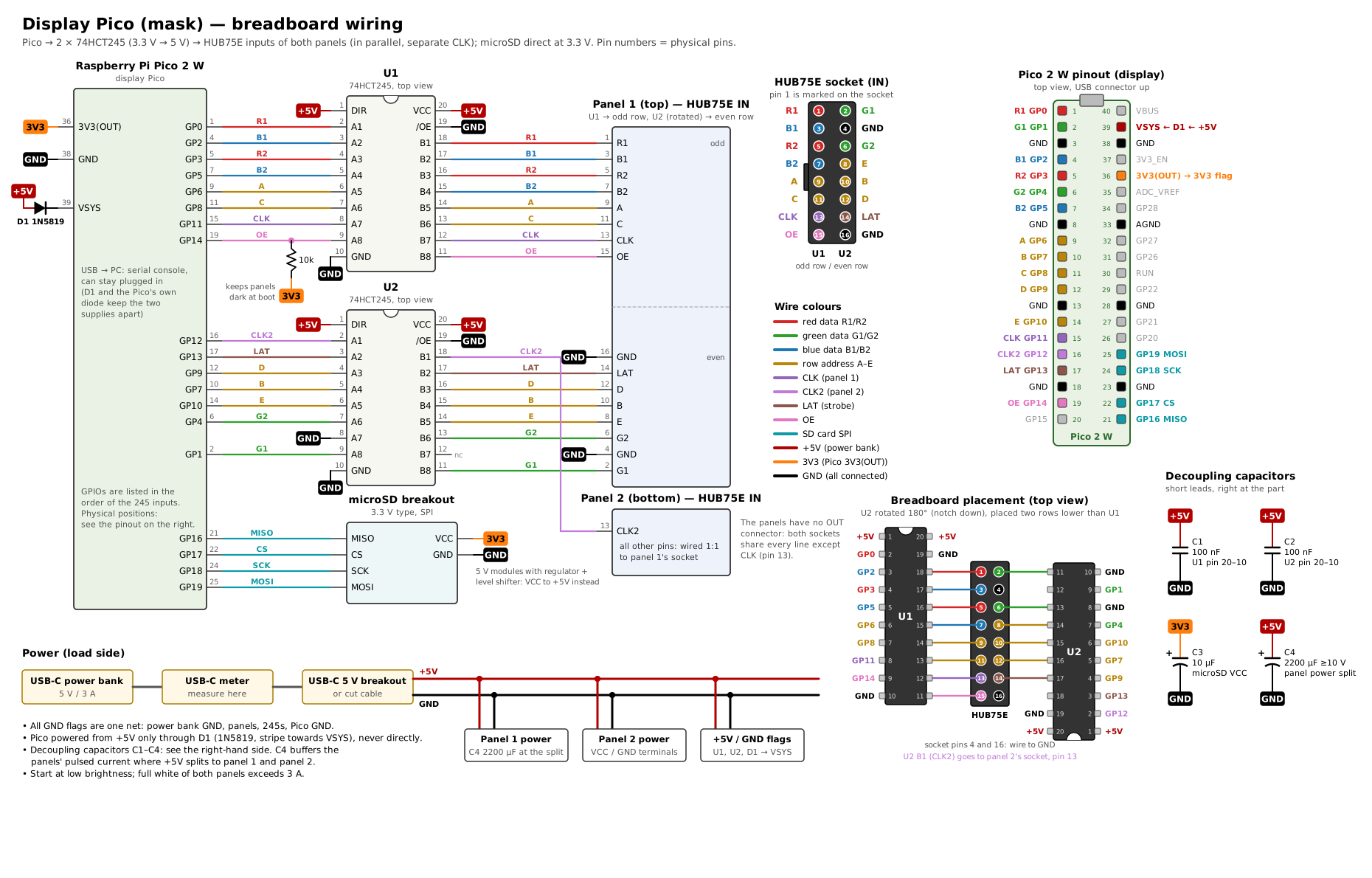
So, my only recommendation is to try it on a breadboard first, map out your common ground and voltage lines on your perfboard and use enough cables with insulation for the unavoidable crossings.
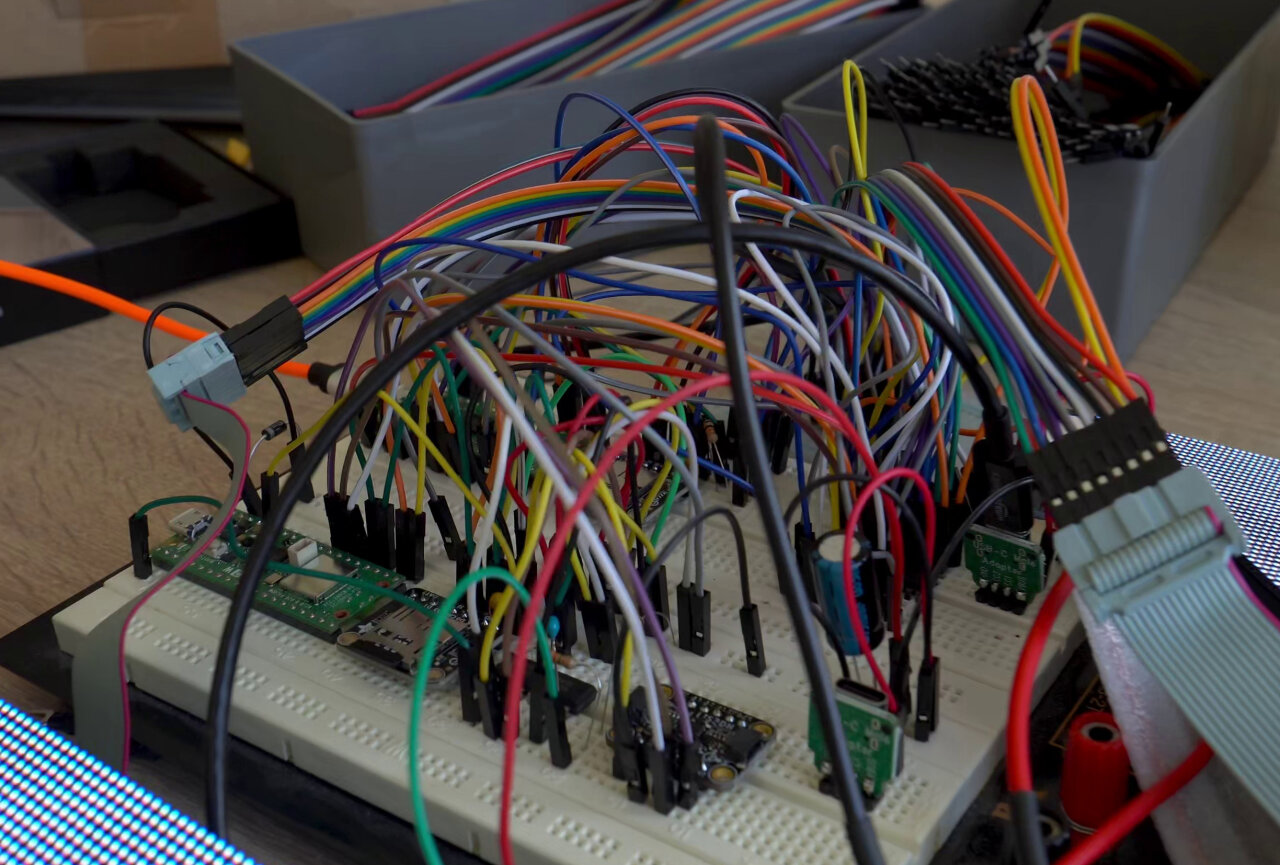
Also, keep in mind that the main power lines to the LED strip and the LED matrix will carry up to 3 amps, so make them solid and thick and think about how you want to hook up the cables. My LED displays came with split cables with a single connector, so I used screw terminals on this board. The LED strip should be fed from both ends, so I had to deal with two power cables, so I picked two insulated wires with a diameter that just fit through the perfboard holes and directly soldered them to the board in different places to distribute the load and then connect everything with Wago clamps.
I am providing three sets of models that need to be 3D printed. You can find them all on GitHub and on the 3D printing sites I use (Printables, Thingiverse and MakerWorld).
Note that the material probably does not matter that much. I printed the staff out of PLA and the mask and display_case out of PETG, but the only reason is that I ran out of black PLA while I was also running out of time. I would have preferred to print everything out of PLA because my beloved plastic glue is not really good for PETG but unbeatable for PLA. So print everything in the kind of black that you prefer. The only exception is obviously the crystal which should be translucent and I used old clear PETG I still had lying around (although thin white PLA should work here, too).
This is the least relevant one. It is a case for the perfboard for the mask circuit. It is clumsy and I just needed a case to not just tape it onto my head unprotected. It is based on an openscad file generated by Claude and in my case it is much taller than necessary because I soldered the USB-C connector awkwardly perpendicular to the board. Therefore, I needed space for the USB-C plug and enough room to bend it gently with a zip-tie stress release. You probably want to modify it to your more elegant perfboard design or replace it entirely. It can easily be printed in two parts. Some minimal support for the opening for the power cables might be a good idea.
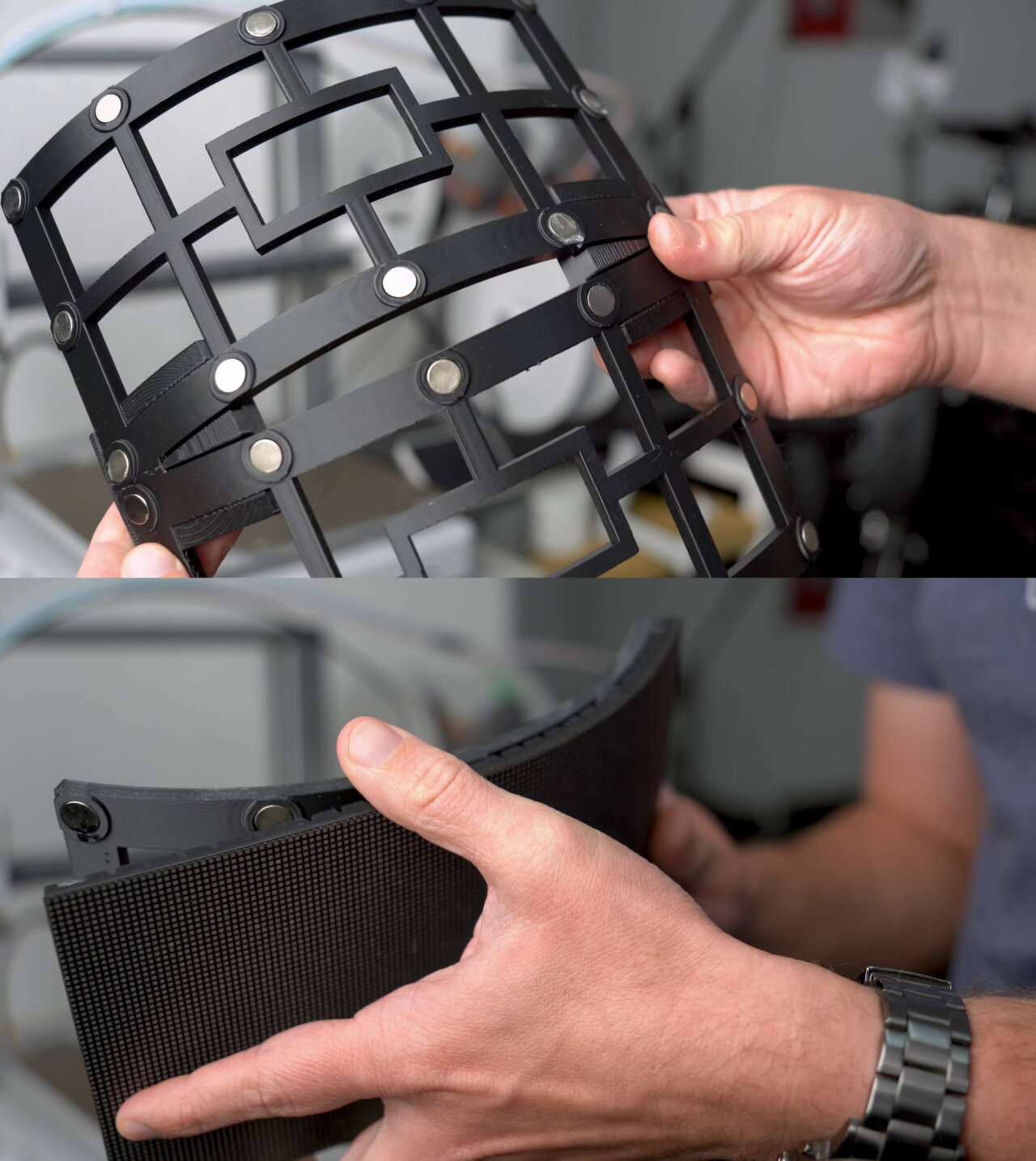
These are also from a Claude-generated openscad file. These are the mounts that hold the panels in place. Print two of them with supports. I printed them upright with tree supports only on the build plate - not ideal, so feel free to change that if you see a better orientation. You need to glue in strong magnets to hold the LED panels in place. For each mount there are twelve magnet slots, so you need 24 in total. I used stacks of three disc shaped magnets with a diameter of 10mm and a thickness of 1.8mm because I had plenty of those at hand. Using single magnets with 5mm thickness (of course still 10mm in diameter) should work even better. You then also need to print two brackets to orient the two mounts at the correct angle to form the viewing slit. Just glue everything together. For the magnets I used normal (slightly elastic) CA glue and for the mounts and brackets I used special glue for plastic models.
Now this is the big one, but all parts should be rather simple to print. I used an increased layer height of 0.28mm to save time. All parts will need supports (tree support on build plate only) except for the crystal which should only have overhangs that are supported by most printers. You will need five unique parts plus the crystal and four copies of the connector. If you want to modify any of it, be warned that I manually created every aspect (including technical details like screw holes) in Blender.
This part of this blog article is embarrassingly short. The only properly designed aspects are the two display mounts with their magnets, which I already explained in the 3D printing section: Print two mounts, glue twelve magnets (10mm diameter with 5mm height or stacks of three 1.8mm magnets) into the holes and then glue both mounts together with two 3D printed brackets.
The rest is extremely improvised. My initial plan was to create a perfectly fitting adapter to attach the LED panels directly to a face shield, which I bought for this project, but the shield part was too wobbly and the weight of the display assembly made it hard to attach it reliably. So, I removed the shield and just attached everything with zip ties to the remaining helmet.
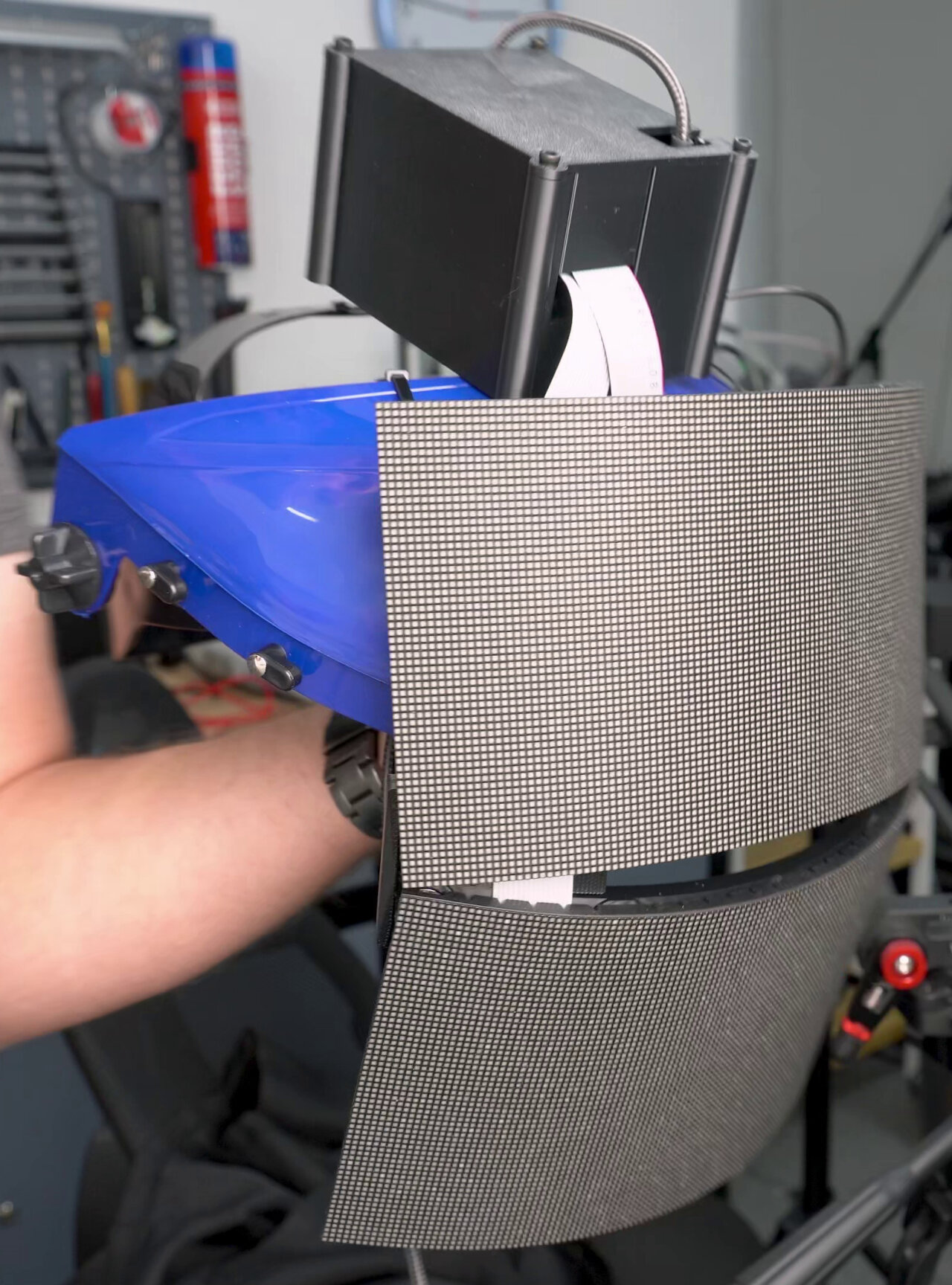
The electronics box went on top of my head, again attached via zip ties. You can probably come up with a similarly good or bad solution on the spot, because in the end these parts are just covered by a hood anyway. Just make sure to secure the USB-C cable and plug properly against strain, so it is not damaged.
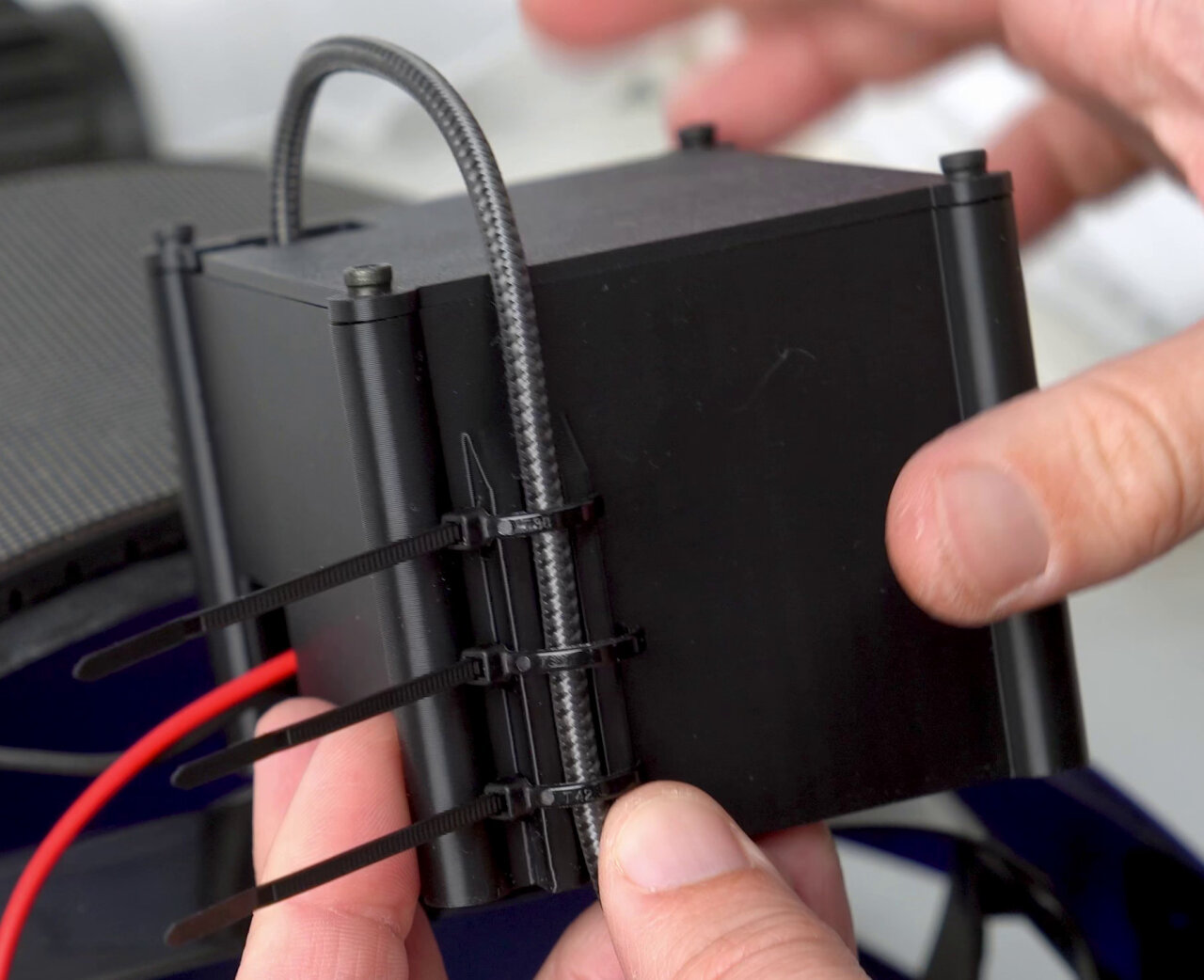
When using the electronics box, there are zip tie slots at one side to secure the cable. However, you might want to think about this when designing your perfboard, because my layout with the USB-C plug perpendicular to the board is really cumbersome.
The staff assembly is much more elaborate, but should be simple enough to understand.
The basis for everything is a flat aluminium bar (20mm width, 2mm height, 1.6m length) onto which I glued the LED strip from both sides. At one end (the bottom of the staff) connect 5V and Ground on both sides and the data pin on one side. At the other end, simply solder GND, 5V and data from both sides together, so the strip effectively continues on the backside of the staff. Mind the direction of the data: The little arrows on the strip need to point up on the front and down on the back, so that the data output of the top LED on the front connects to the data input of the top LED on the back. I used 180 LEDs in total, but the exact number as well as the exact LEDs that are later covered by the grip and hence should remain unused can be set in the firmware. There is no configuration file for this, so you will have to change them in the source code and rebuild the firmware.
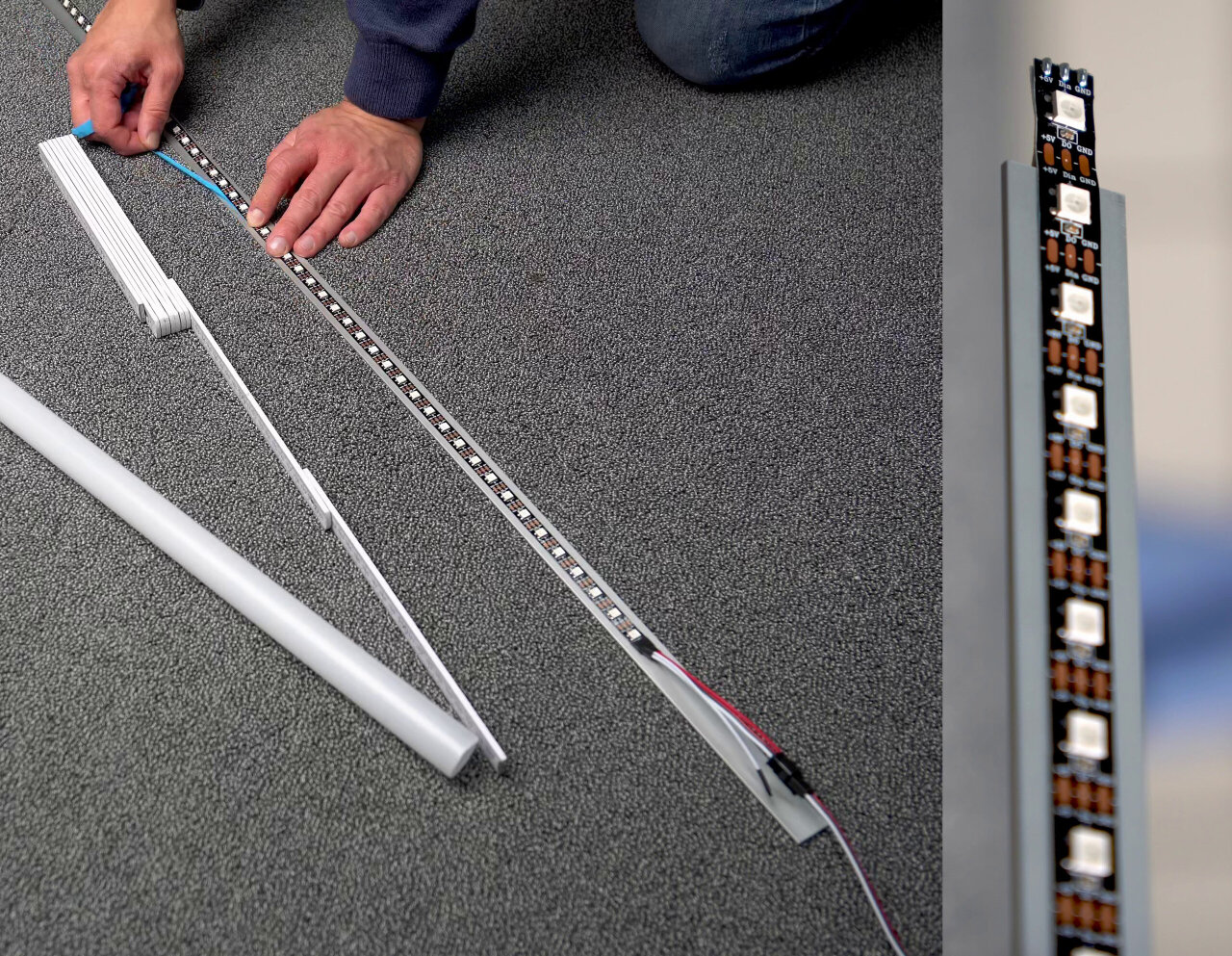
Leave some part of the aluminium bar at the bottom (the end with the cables) free of LEDs as it is inserted (or should I say “pressed”) into the base assembly. This assembly consists of the “bottom_main” that holds the aluminium bar and the “bottom_plate”, which is the cover for the slot for the power bank. Note that this is designed to perfectly fit the power bank that I used and you probably need to adapt it if you cannot find the exact same model. The base also holds the perfboard on the part “controller_board_plate”. This one takes M2 screws and M2 heat-set inserts (all sizes should fit) for the board and all three base parts are connected with M3 screws and M3 heat-set inserts (2 connecting the bottom_plate with the bottom_main and four fixing the controller_board_plate to the bottom_main). At this point also add the four M3 thread inserts at the top of the base to which you will need to attach one of the four 3D printed connectors.
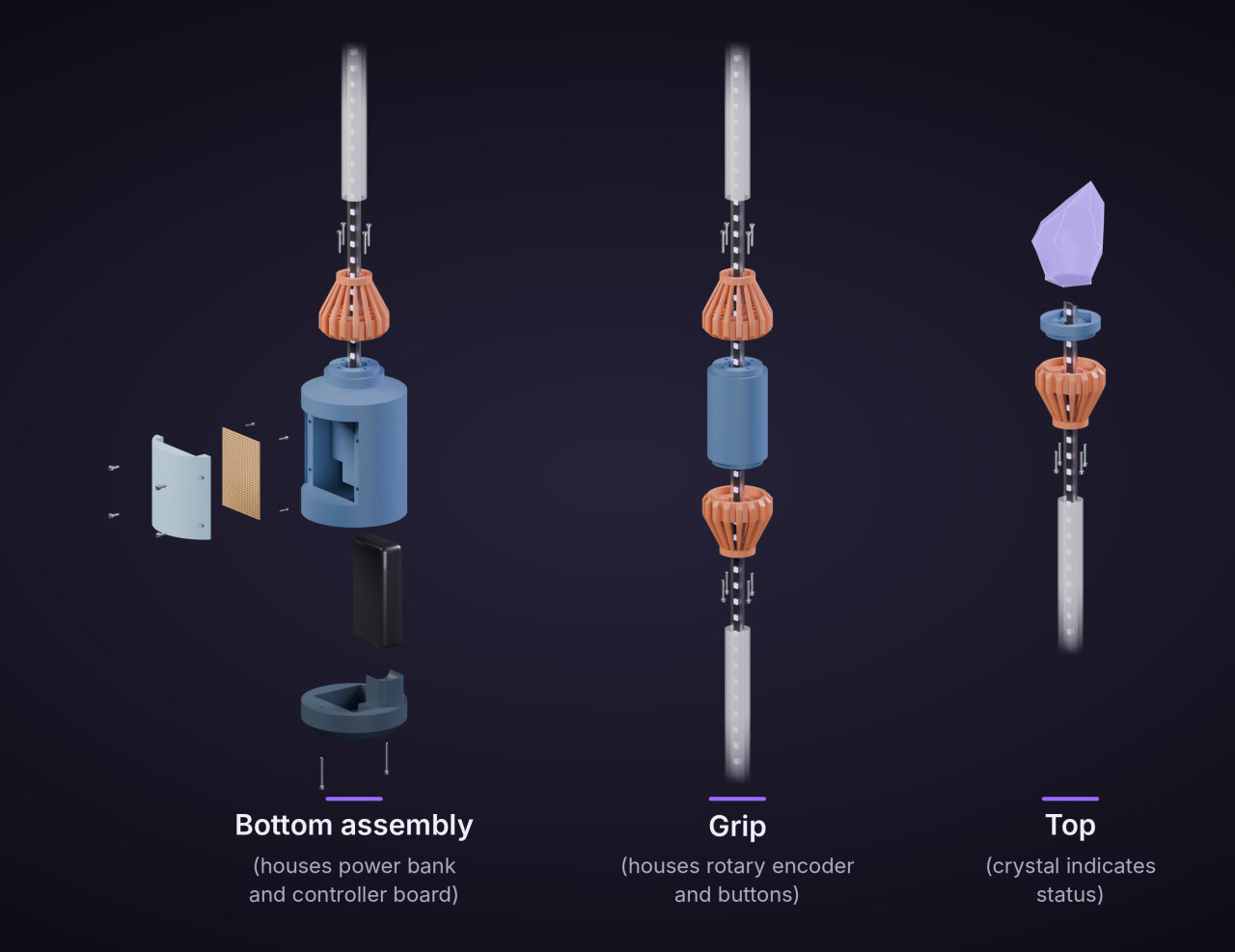
The bottom should have enough room to accommodate cables and I used Wago clamps to connect the LED cables to the controller board. At this point you should also run six wires from the button pin headers on the perfboard next to the LEDs, so you can later attach the rotary encoder and the buttons. You need a common ground, two pins for the encoder rotation, one for the encoder push button and two for the separate buttons. I used a ribbon cable that I simply zip tied next to the LEDs on the aluminium bar. Make sure it is flat next to the LEDs, so it does not cast a shadow.
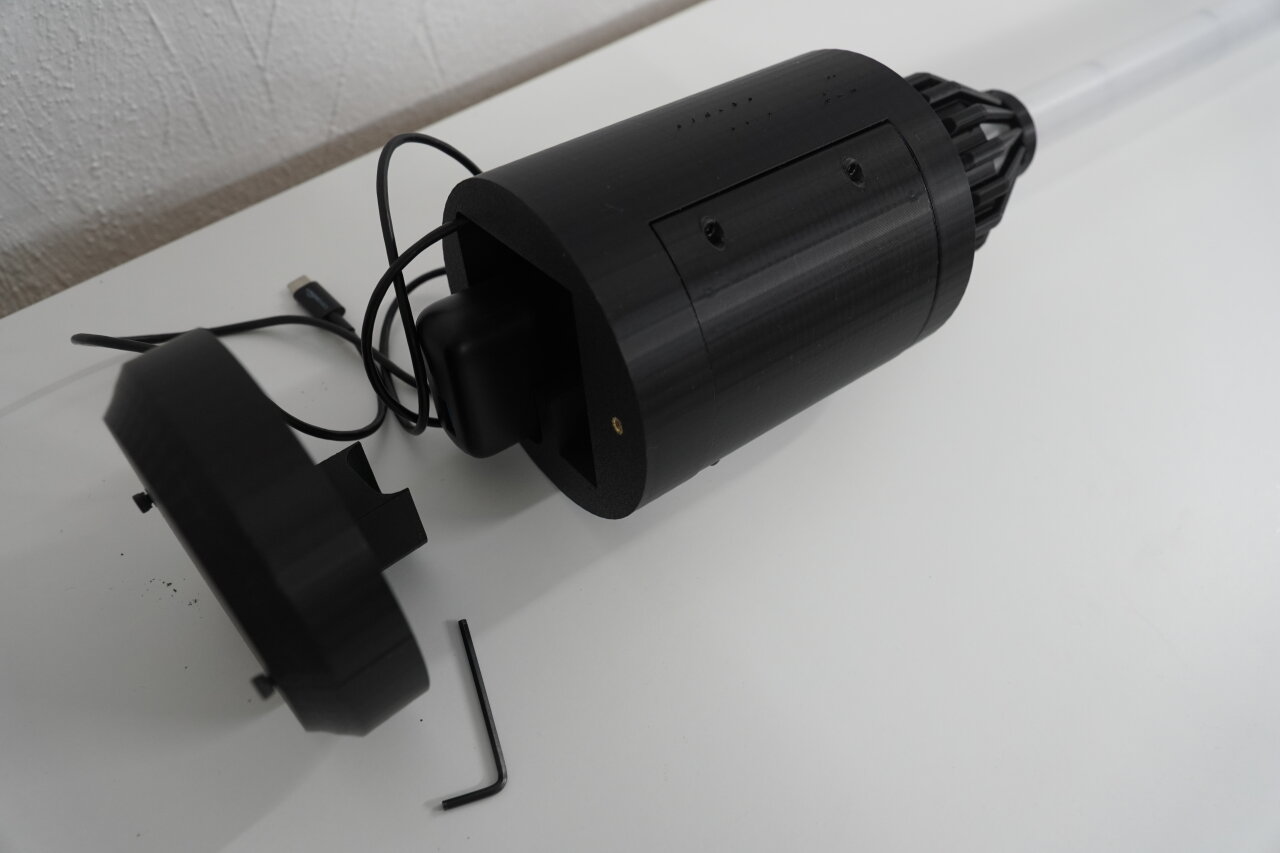
You also want to secure the cables from the controller board with a zip tie to the aluminium bar and then push one of the four connectors over the bar and screw it to the base assembly. If all cables along the bar are secured (zip ties all the way) for a length of about one meter, push the first diffusor tube (1 meter) over the bar and press it into the connector.
Next, the grip with the buttons can be a bit tricky. You need to first insert the rotary encoder and the buttons into the holes in the grip with the cables coming out at the bottom. Tweezers can be helpful to hold the counter screws of the buttons on the inside and then gently and very patiently turn them. Again, add four M3 heat-set thread inserts on both sides to secure connectors later.
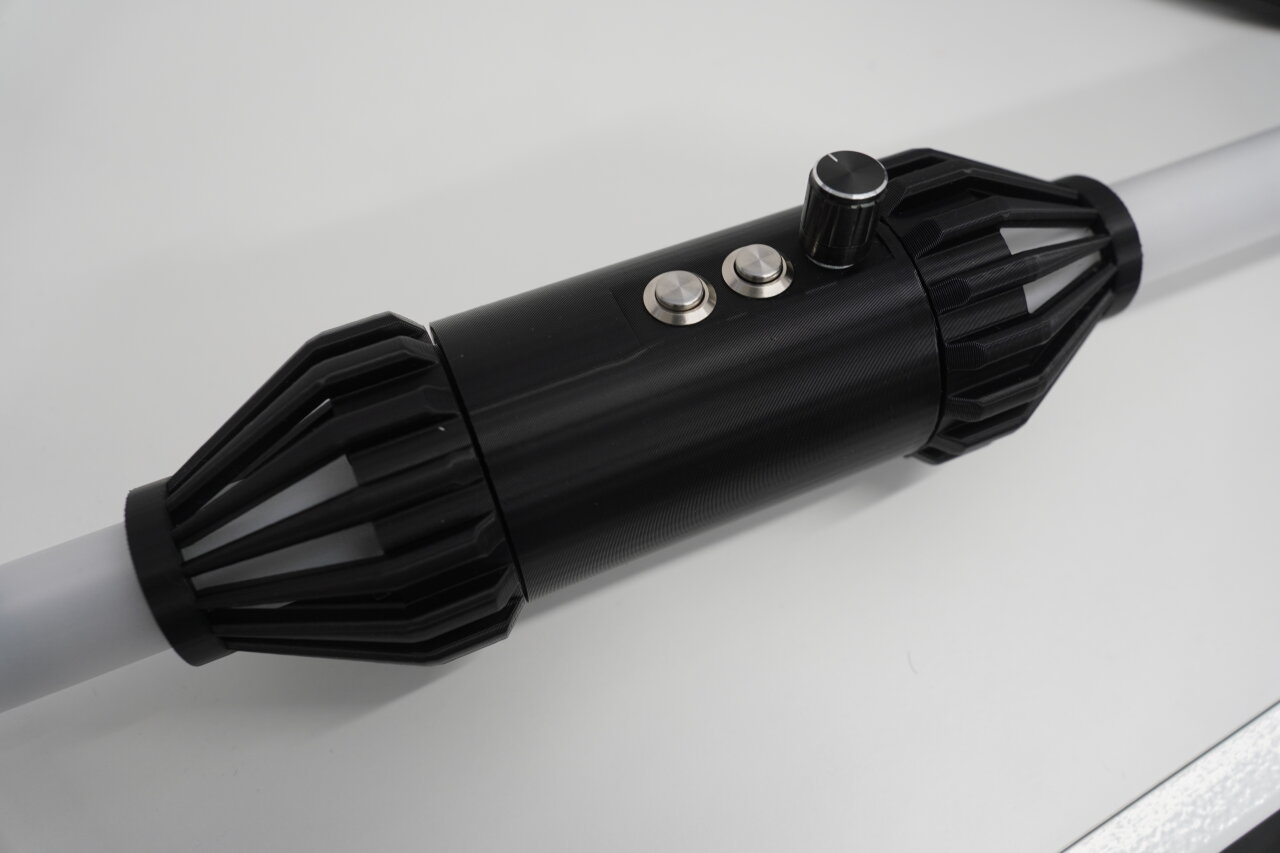
When the grip is prepared, slide the second connector onto the bar and press the diffusor tube that is already on the bar into it. Then slide the grip onto the bar with the cables coming out the bottom end with the larger opening. Solder the cables to the ribbon cable leading to the controller board (don’t forget to insulate your work with shrink tubes). Then you can push the remaining length of cable into the grip, screw it to the connector and also push another connector onto the bar at the top and screw that one, too.
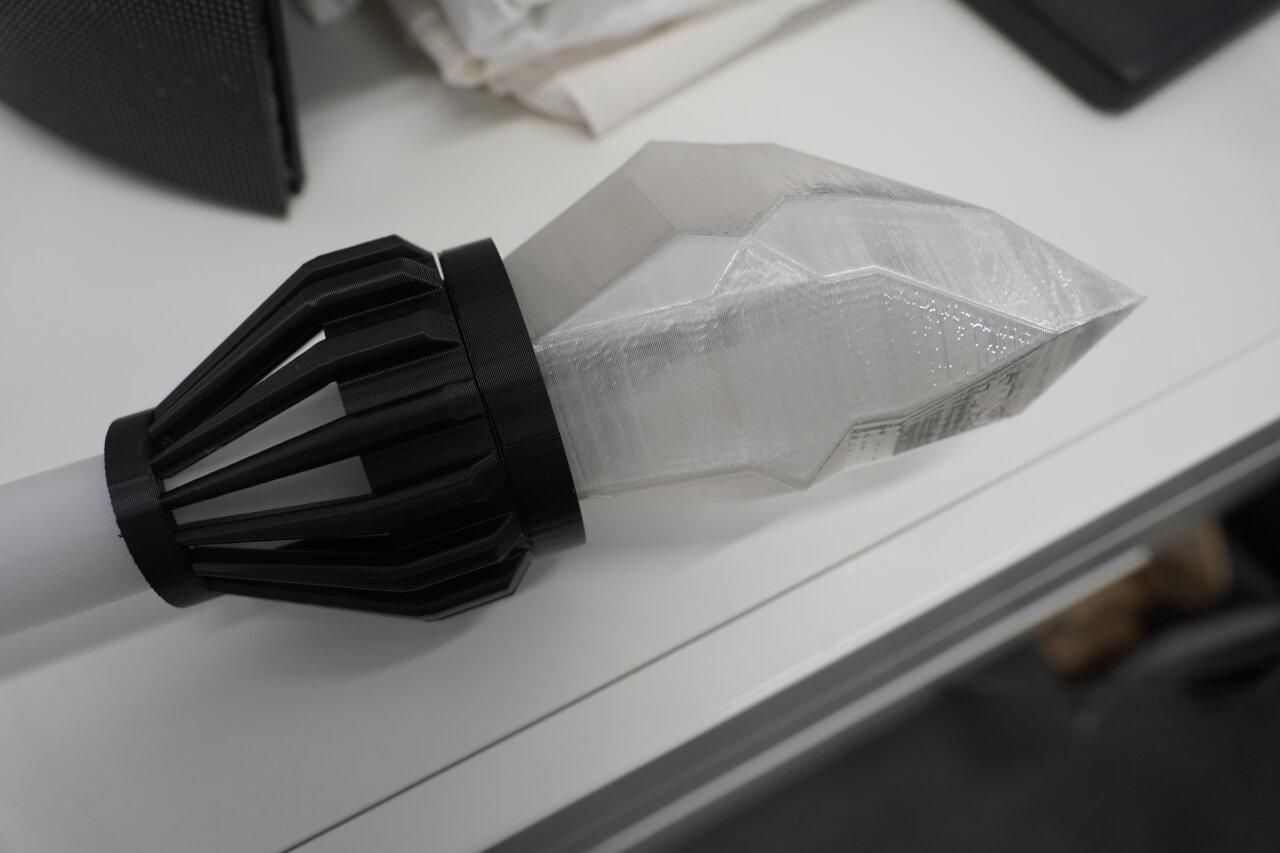
The remainder of the assembly is simple. Slide on and push in the shorter diffusor tube, screw a connector to the “top_base” part and slide both onto that tube. Measure the length of the diffusor tube such that three LEDs on each side (so six in total) come out of the “top_base” element as they will illuminate the crystal. Finally, the crystal can just be pressed into the “top_base” part. If it is too loose, just add a little bit of glue.
Honestly, this project turned out to be much more work than I expected and if you count every part it is much more expensive than what I would consider reasonable for a costume. If I did not already have many parts and if I did not enjoy having another project for my blog and YouTube channel, I would not have done it. Still, in the end I am looking forward to showing this off and seeing the reaction of the first family member who curiously has a closer look at those minimalistic eyes on the mask until he is confronted with the transition to a full burning skull.
I hope you can use some of the details and documentation I am sharing here, although as so often with these projects I cannot provide a perfect step-by-step guide and some improvisation is still required.
This is a link to the exact product I bought on Aliexpress. However, as you might be aware, these links are short-lived and often replaced with similar products, so I cannot guarantee that you get exactly the same panels here. ↩
To be honest, I did not find any detail about the maximum bend radius for my panels. They have rubber spacers at the back that limit the curvature, so I would assume that this is the limit and in my costume I am close to that limit. ↩
It is a compromise between what you want to carry on your belt and how impressive you want it to be, but the more bass the speaker can provide (and nowadays small packages can deliver surprising amounts of bass) the more punch a transition has. ↩
I have included a playlist with less serious characters, like showing my own face, but in my own version there is also a family playlist with faces from my family, starting with the uncle that is throwing the party - I am not sharing that list, though. ↩
This is one of the EC11 rotary encoders I had left over from my old inkkeys e-ink macro pad project. ↩
If you have followed my blog, you might even know these from my smart bell project. ↩
Usually, I keep my work and hobby projects separate, but here it makes sense to mention it. It’s an app that gives access to smartphone sensors for science education that I have been developing for more than ten years. Look it up - if you like my blog, you will probably like this app. ↩